

Views: 0 Author: Site Editor Publish Time: 2026-10-07 Origin: Site


Sinking into a plush sectional after an exhausting day to binge-watch a favorite series should be relaxing. Yet, many find themselves constantly shifting cushions to relieve a stiff neck. Purchasing expensive furniture cannot fix a poorly planned layout. A truly comfortable and visually stunning entertainment space requires precise ergonomic science and interior design geometry.
At the core of this spatial equation is the media console. It serves as the foundational anchor of the living room. To achieve optimal comfort and seamless style, the setup must be carefully calibrated to your seating dimensions and ideal viewing distance. This comprehensive guide breaks down the exact measurements and layout strategies needed to coordinate your furniture, eliminating guesswork and preventing physical strain.
The Width Rule: The media console should always extend beyond the physical edges of the television. Leaving two to three inches on each side guarantees physical stability and maintains visual harmony.
Viewing Distance Dictates Size: The spatial gap between the seating position and the console must determine the screen size, rather than the vastness of an empty wall.
Eye-Level Alignment: The vertical height of the furniture must align with the seat height of the couch. This ensures the center of the screen rests at a natural, comfortable eye level.
Proportional Weight: A massive, overstuffed sectional paired with a fragile media unit shatters room symmetry. Matching the visual weight of these pieces is essential for a cohesive interior.
Before diving into specific measurements, it is crucial to understand current industry shifts. Recent interior design analytics reveal a massive consumer migration toward ultra-large screens, often 75 inches or larger, even in moderately sized living rooms. This market evolution has fundamentally disrupted furniture engineering. Modern ultra-thin OLED and QLED panels have altered traditional centers of gravity, requiring media consoles to be significantly wider, lower to the ground, and built from high-density materials to prevent sagging. Adapting to this trend means prioritizing structural integrity alongside aesthetic appeal.
A frequent and frustrating misconception in layout planning revolves around how we measure electronics versus furniture. Televisions are advertised by their diagonal screen size, whereas furniture is measured straight across horizontally. Consequently, a standard 65-inch screen is not actually 65 inches wide; its physical footprint spans roughly 57 inches. Purchasing a 57-inch base means the edges of the screen will sit entirely flush with the edges of the furniture, leaving zero overhang.
Ergonomic experts and safety standards strongly recommend leaving a minimum of two to three inches of extra surface space on either side of the base. This crucial overhang prevents accidental tipping hazards. This detail is particularly vital for households bustling with active pets or young children. Furthermore, an inverted pyramid shape, where the top is wider than the base, creates uncomfortable visual tension. Investing in a robust, sturdy TV stand grounds the entire setup, providing a stable foundation that anchors the room.
While lateral width often steals the spotlight, depth remains an equally critical dimension for functional daily living. Standard media units typically range from 15 to 20 inches deep. This measurement must comfortably accommodate the footprint of the screen base, which can occasionally be surprisingly bulky. It also needs to house auxiliary equipment like immersive soundbars, gaming consoles, and streaming boxes.
Specifically, proper depth guarantees adequate thermal ventilation. High-performance electronic devices generate significant heat. A unit that is excessively shallow forces devices flush against the drywall, choking off airflow and drastically reducing hardware lifespan. You must simultaneously ensure that a deeper cabinet does not aggressively encroach into the walking space between the screen and the seating area, preserving a clear traffic flow.
In the realm of interior styling, visual weight describes how heavy or substantial a piece appears to the human eye, regardless of its actual poundage. The perceived bulkiness of the media console should directly converse with the other primary elements in the room.
For instance, a heavy, solid mahogany piece pairs exceptionally well with large, overstuffed leather sectionals. The substantial nature of both items creates a balanced, grounded symmetry. In contrast, placing a bulky, dark-stained unit opposite a delicate, mid-century modern loveseat completely overpowers the space. For airy, minimalist setups, a console featuring slender lines or a bright white finish introduces the appropriate visual lightness.
The geometric relationship between couch length and console width dictates the underlying harmony of the living area. While these two focal points do not need to mirror each other in exact length, jarring contrasts must be avoided. Positioning a sprawling 120-inch sectional directly opposite a compact 40-inch cabinet creates a disjointed, chaotic environment.
A highly reliable interior design guideline is the two-thirds rule. Ideally, the media console should span at least two-thirds the total width of the primary seating. This deliberate proportion ensures that the entertainment zone feels like an anchored, intentional destination rather than a hasty afterthought. It fosters a balanced dialogue between where you sit and what you watch.
Flawless furniture coordination demands strict adherence to spatial clearances. The functional rhythm of a room is instantly compromised if the gap between the seating and the media unit feels cramped. Standard architectural guidelines dictate maintaining at least 18 to 24 inches of breathing room between the front edge of the cushions and the coffee table.
Beyond that central table, you must preserve an unobstructed primary walkway. It is highly recommended to leave a minimum of 30 to 36 inches of clear walking space between the coffee table and the media console. If the architectural footprint is exceptionally tight, opting for a console with a narrower depth profile helps salvage these vital traffic routes without sacrificing structural stability.
Precise alignment is the absolute cornerstone of a fatigue-free viewing experience. For optimal ergonomics, the exact dead-center of the primary seating area, typically the middle cushion of the couch, should align flawlessly with the center of the media console.
This geometric centering becomes exponentially more crucial for expansive multi-seater couches. When the architecture of the room forces an off-center setup, viewers relegated to the far ends of the couch are forced to watch the screen at an oblique, distorted angle. This degrades perceived color accuracy and induces asymmetrical posture, sparking muscle fatigue over extended movie marathons.
Determining the perfect gap between the cushions and the screen is a rigid science governed by established industry standards. Organizations such as the Society of Motion Picture and Television Engineers and THX have engineered specific formulas based on human visual acuity and peripheral field of view.
To replicate a highly immersive cinematic experience, THX recommends achieving a 40-degree field of view. A simplified, universally accepted formula derived from these rigorous standards dictates multiplying the diagonal screen size by 1.2 to 1.5 to find the viewing distance in inches. Positioning the seating within this calculated sweet spot ensures the moving image occupies enough of the visual field to be deeply engaging, without forcing physical head pivoting to track on-screen action.
To bypass complex mental math, refer to the empirical data in the table below. This chart correlates standard screen sizes to the optimal distance, measured straight from the front of the headrest to the front edge of the media console.
TV Size Diagonal | Approx. Physical Width | Minimum Distance Multiplied by 1.2 | Maximum Distance Multiplied by 1.5 |
|---|---|---|---|
55 inches | 48 inches | 66 inches | 82.5 inches |
65 inches | 57 inches | 78 inches | 97.5 inches |
75 inches | 65 inches | 90 inches | 112.5 inches |
85 inches | 74 inches | 102 inches | 127.5 inches |
The pixel resolution of the panel directly dictates how close you can safely position the seating. Older 1080p models possess a significantly lower pixel density. Sitting too close to these older screens makes individual square pixels glaringly visible, shattering image illusion and degrading clarity.
Conversely, modern 4K panels boast four times the pixel density of their predecessors. This massive technological leap allows seating to move much closer to the media console, leaning heavily toward the shorter minimum distance in the formula, without suffering visual pixelation. This advantage is a game-changer for compact urban apartments where maximizing screen real estate within a constrained spatial footprint is highly desired.
The absolute most critical factor in preventing cervical spine degradation during binge-watching is strict adherence to the eye-level ergonomic rule. Physical therapists universally agree that the vertical dead-center of the screen must perfectly intersect the natural horizontal line of sight when seated in a relaxed posture.
To pinpoint this metric, sit on the couch exactly as you normally would. Measure the straight vertical line from the floorboards to your pupils. For an average-height adult relaxing on a standard cushion, this measurement consistently lands between 40 and 42 inches. Forcing cervical vertebrae to tilt upward for hours on end places unnatural, compounding stress on the neck, inevitably leading to chronic pain.
Because this crucial eye-level rule relies entirely on the body seated position, the specific architectural style of the couch heavily dictates the required height of the furniture purchase. Low-slung, ultra-modern minimalist couches often feature seat heights hovering a mere 15 inches off the rug. Pairing a low-profile couch with a tall, traditional media cabinet severely forces the gaze skyward.
On the flip side, traditional, overstuffed high-back couches typically feature elevated seat heights ranging from 19 to 21 inches. These plush setups demand taller media cabinets to ensure the screen remains elevated to the appropriate, comfortable ergonomic plane. Physically measuring specific cushions before making a purchase is non-negotiable.
To eliminate guesswork, use a precise mathematical formula to calculate the exact height required for new furniture. First, determine the seated eye-level height. Next, measure the total vertical height of the screen and divide that number in half, giving the distance from the bottom bezel to the center point.
Subtract half of the television height from the eye-level height to find the ideal console height. For example, if the relaxed eye level is 42 inches, and the screen is 32 inches tall with half being 16 inches, the mathematically perfect height for the base furniture is exactly 26 inches.
A remarkably frequent architectural pitfall is purchasing an entertainment setup based exclusively on the vastness of an empty wall. Many homeowners stare at a massive, 15-foot blank expanse and falsely assume they are obligated to purchase an 85-inch panel and a correspondingly gigantic cabinet simply to fill the void.
However, if the seating arrangement is positioned only six feet away from that expansive wall, an 85-inch screen aggressively violates ergonomic viewing distance standards. This forces eyes to dart frantically back and forth to catch the action, quickly leading to severe visual fatigue and motion sickness. The physical distance from the cushions to the console must always act as the supreme dictator of screen size. Wall space is merely a secondary aesthetic consideration.
While natural sunlight breathes life into a room, it is the ultimate nemesis of screen visibility. A devastating positioning error is placing the media setup directly opposite a large, unshaded window or sliding glass door. During peak daylight hours, the sun rays reflect directly off the glass panel, causing a harsh, blinding glare that completely washes out cinematic contrast and forces constant squinting.
Data-driven spatial planning suggests that the optimal layout involves positioning the entertainment zone perpendicular to primary natural light sources. If quirky room architecture forces the seating to face a window with the screen in between, investing in high-quality, opaque blackout treatments is required to aggressively control ambient light levels during daytime streaming.
Mounting a screen too high is arguably the most ubiquitous and physically punishing design error in modern home renovations. This tragedy frequently occurs when homeowners insist on mounting screens high above masonry fireplaces, forcing the action far above the comfortable 42-inch ergonomic eye level.
When a display is hoisted too high, viewers are subjected to continuous neck hyperextension. Furthermore, traditional LED panels suffer from noticeable off-axis color degradation. Viewing a screen from a sharp, upward angle causes vibrant colors to shift into muddy tones and deep blacks to fade into washed-out grays. Keeping the display securely anchored on an appropriately sized cabinet eliminates both mechanical spine strain and frustrating visual degradation.
A truly effective living room layout must ruthlessly account for the inevitable accumulation of electronic clutter. Items such as sprawling HDMI cables, bulky gaming controllers, remote controls, and streaming peripherals can rapidly transform the serene space between the couch and the screen into a chaotic mess.
Psychological studies on interior spaces reveal that visual clutter significantly increases cognitive load, subtly distracting viewers from fully relaxing. Therefore, selecting a media unit equipped with integrated, enclosed storage is a foundational design strategy. Concealing chaotic wiring and neon-colored accessories behind solid wood doors or deep drawers maintains a pristine, distraction-free line of sight.
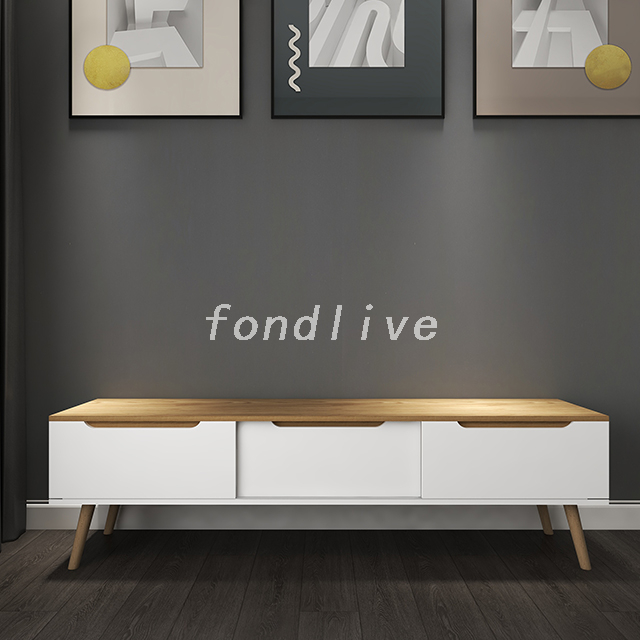
When evaluating premium storage solutions that do not compromise on high-end aesthetics, looking at exact material specifications is vital. A White Wooden Modern TV Stand with 3 Drawers provides a masterclass in balancing practical utility with contemporary appeal. From an engineering standpoint, selecting a unit constructed from E1 grade MDF ensures high load-bearing capacity, preventing the center sag commonly seen in cheaper particleboard units supporting heavy 75-inch screens.
In addition, empirical design principles emphasize that crisp white, scratch-resistant finishes brilliantly reflect ambient room light. This optical trick makes cramped living rooms feel instantly more expansive and breathable. The deliberate integration of three distinct, deep storage drawers featuring silent metal glides allows for meticulous, category-based organization. Dedicating one specific drawer to tangled gaming headsets, another to power cables, and the final one to everyday knick-knacks guarantees that the sleek top surface remains entirely unblemished, reserved solely for optimal screen placement.
Begin the room transformation with precise data collection. Grab a reliable steel tape measure and record the exact, outer-edge-to-outer-edge width of the couch. Next, measure the seat height from the floorboards to the top of the cushion, ideally while someone is sitting on it to account for foam compression. Finally, measure the total depth of the room to fully grasp the maximum spatial envelope available to work within.
Take a seat in the primary spot on the cushions and lean back into a natural posture. Have a friend measure the straight-line distance from the bridge of the nose to the exact floor location where the front edge of the prospective media cabinet will sit. Utilize this highly specific measurement in conjunction with viewing distance formulas to definitively verify what size display the room can comfortably handle.
Before swiping a credit card, translate abstract numbers into a tangible, physical mock-up. Utilize rolls of blue painter tape to explicitly outline the exact width, depth, and height of the intended media cabinet directly onto the hardwood and drywall. This remarkably simple, low-tech visualization hack provides immediate, visceral feedback on exactly how the new furniture will impact daily walking routes and overall room proportions.
Achieving the ultimate, cinematic entertainment layout requires masterfully balancing three critical variables: coordinating cabinet width to provide a safe overhang for the screen, calibrating physical distance based on panel size, and perfectly aligning vertical height with seated eye level. Relying on cold, hard measurements rather than optimistic guesswork completely eradicates neck strain and cultivates a visually harmonious, inviting sanctuary.
Taking a mere ten minutes to measure the room accurately saves years of physical discomfort and the logistical nightmare of returning oversized furniture. Elevate the daily unwinding ritual by investing in a perfectly proportioned modern wooden media console that anchors the living space with both impeccable style and rigorous ergonomic precision. Browse premium, engineered solutions at Fondlive to find the exact dimensions that match your newly calculated living room blueprint.
Yes, it certainly can be the exact same width, but it is by no means a strict interior design requirement. From an aesthetic standpoint, it is vastly more important that the media console is noticeably wider than the television itself. If the cabinet matches the exact sprawling width of a massive, U-shaped sectional, it may aggressively dominate the room and make the space feel visually suffocating. The ultimate goal is proportionality. The console should gracefully complement the visual weight of the seating area without necessarily duplicating its exact footprint, ensuring the room remains balanced and breathable.
Placing a massive, heavy screen on a smaller, narrower base creates a precarious, top-heavy setup that is structurally unstable. This introduces a severe tipping hazard, especially in active households with rambunctious children or large pets. A minor bump to the cabinet could easily send the screen crashing to the floorboards. Visually, this lack of overhang creates a jarring inverted triangle effect that looks cramped, awkward, and hastily planned. Industry safety guidelines strongly dictate that the base furniture must extend at least two to three inches beyond the edges of the screen on both sides.
Relying on standardized, scientific guidelines established by industry engineers, the ideal viewing distance for a modern 65-inch 4K display is approximately 6.5 to 8 feet directly from the viewer pupils. Relaxing within this specific range allows the vibrant screen to comfortably occupy roughly 30 to 40 degrees of the horizontal field of view. This delivers a highly immersive, theater-like experience without inducing pixelation or forcing constant neck swiveling to follow on-screen action.
Both installation methods offer distinct, objective merits. Wall mounting undeniably saves valuable floor space and delivers a sleek, ultra-minimalist aesthetic, provided the drywall and studs possess the structural integrity to bear the load. However, relying exclusively on a wall mount frequently leaves ugly cables dangling exposed and offers zero storage for peripheral streaming devices. Utilizing a high-quality media console provides essential, enclosed storage, naturally conceals unsightly wiring, and beautifully anchors the room visual weight. Even if choosing to bolt the screen to the wall, placing a well-designed cabinet directly underneath is highly recommended to maintain interior design balance and provide necessary daily utility.
Strict matching is an outdated design rule. While the coffee table and media console should communicate aesthetically, buying a rigid, identical matching set often makes a living room feel like a sterile furniture showroom rather than a curated home. Instead of matching exact finishes, focus on coordinating materials and visual weight. If you have a crisp white MDF media console, pairing it with a light oak or glass-topped coffee table introduces texture and warmth while maintaining a cohesive, modern spatial flow.
For a massive 75-inch display, depth is critical for both stability and thermal management. The base legs of a 75-inch screen can easily span 13 to 15 inches in depth. Therefore, the console must be an absolute minimum of 18 inches deep, with 20 to 22 inches being optimal. This extra depth ensures the heavy panel is firmly planted away from the edges, provides necessary breathing room for high-heat gaming consoles, and allows thick HDMI and power cables to route cleanly without being aggressively crushed against the drywall.


