

Views: 0 Author: Site Editor Publish Time: 2026-11-13 Origin: Site


You just mounted a stunning ultra-high-definition display perfectly centered on the living room wall. The picture quality is breathtaking. Yet, a quick glance below the screen reveals a chaotic tangle of black and grey cords hanging loosely against the baseboard. Multiple peripheral devices, ranging from next-generation gaming consoles and sleek soundbars to streaming boxes and bulky routers, inevitably create a sprawling web of clutter.
This sprawling mess acts as a significant eyesore disrupting your curated interior design. Worse, it presents a legitimate safety hazard for households with curious pets or energetic toddlers. Fortunately, a properly engineered TV Stand serves as the ultimate remedy to this widespread architectural problem. Today's entertainment furniture has evolved far beyond a simple flat surface meant to hold a heavy screen. Modern iterations are precise mechanical ecosystems designed to hide, route, and protect your complex electrical setups. This comprehensive guide explores the mechanics behind wire organization, explains why thermal dynamics and structural integrity matter, and details how to choose the perfect console for a pristine living space.
Built-In Solutions: High-quality media consoles utilize strategic routing holes, hidden channels, and specialized back panels to seamlessly conceal electrical cords and data cables from plain sight.
Thermal Efficiency: Proper wire organization directly improves interior cabinet airflow. Unobstructed convection is necessary to prevent expensive electronics from thermal throttling or hardware failure.
Safety and Durability: Keeping cables systematically anchored prevents household tripping hazards and protects sensitive signal wires from being crushed under heavy equipment.
Smart Purchasing: Prioritizing factory-integrated cord concealment saves significant time and frustration compared to implementing aftermarket DIY modifications.
Recent market analysis highlights a massive shift in consumer expectations regarding living room architecture. Buyers are no longer accepting exposed wiring. The rise of minimalist interior design trends, coupled with the increasing complexity of smart home ecosystems, has forced furniture manufacturers to innovate. Modern audiovisual setups now require thick, heavy-gauge HDMI cables for high-refresh-rate gaming and optical audio cables for immersive soundbars.
Consequently, industry trends show a surging demand for "invisible tech" furniture. Today’s Media Unit is treated as a highly specialized piece of engineering rather than basic carpentry. Manufacturers are integrating concealed power strips, magnetic rear access panels, and hollow support pillars to accommodate dense cable bundles. The ultimate objective is achieving a sleek, floating aesthetic where only the vibrant display and elegant furniture finish remain visible, entirely masking the chaotic mechanical reality behind the scenes.
In the context of interior design and home electronics, organizing wires refers to deliberate architectural strategies used to conceal electrical power cords and data lines. It is a systematic approach ensuring that cables travel from your hardware to the wall outlet without creating visual clutter or physical obstructions. Historically, older television stands were essentially reinforced tables offering a flat surface but zero infrastructure for peripheral devices. As home theater ecosystems grew increasingly complex, the furniture structure had to adapt.
To achieve a professional-grade setup, you must understand how these structural elements interact with your electronics. A well-designed console acts as a central hub, separating high-voltage power lines from low-voltage data cables to prevent electromagnetic interference while keeping everything completely out of sight.
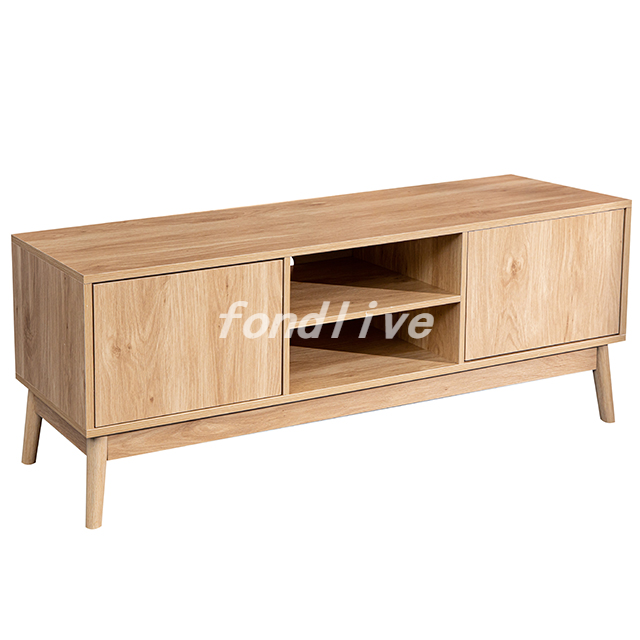
To effectively hide and protect wires, engineers incorporate specific structural features into their designs. Understanding these components is crucial for evaluating the utility of a unit and maximizing its potential.
The most fundamental organizational feature is the inclusion of pre-drilled routing holes. Located in the back panels and interior dividing shelves, these cutouts allow cables to pass seamlessly between different enclosed compartments. Premium models fit these holes with rubberized edges. The flexible rubber grips the cables to prevent them from slipping backward, while simultaneously protecting the delicate outer insulation of the wires from being sliced by sharp edges.
High-end furniture takes organization a step further by incorporating integrated wire channels. These are essentially hollowed-out pathways built directly into the frame. For instance, a 47-inch floor universal stand often utilizes a central cold-rolled steel pillar. This hollow spine captures thick bundles of cables from the mounted screen and guides them straight down to the base, ensuring no wires dangle visibly beneath the main chassis.
Accessibility is just as critical as concealment. Quality stands feature magnetic, sliding, or easily removable back panels. This modular design provides direct, unhindered access to power strips and large cable bundles when you need to swap a connection. Once the wiring is complete, the panel snaps back into place. Furthermore, recessed back panels leave a slight gap between the furniture and the wall, providing a safe vertical drop for cables even when the unit is pushed flush against the baseboard.
Thoughtful interior design frequently includes built-in hardware for securing loose wires. Integrated plastic clips or anchor points for hook-and-loop fastener straps allow users to tie down cables tightly against the interior walls of the cabinet. Keeping wires taut and anchored prevents them from bowing outward, ensuring they never interfere with metal hinges or sliding drawer tracks.
There is a direct and measurable relationship between how you route your wires and how well your electronics perform. Modern home theater equipment generates a substantial amount of thermal energy. Audio receivers, high-performance gaming consoles, and 4K streaming devices draw significant electrical power, converting much of it into heat.
If a cabinet is stuffed with a tangled nest of wires, those bulky cables consume valuable physical volume. More alarmingly, a dense cluster of cords acts as a physical barrier blocking the exhaust vents on your hardware. When hot air cannot escape, it remains trapped inside the enclosed compartments. This leads to thermal throttling, where processors slow down to prevent melting, or even permanent component failure. In severe cases, chronic overheating drastically reduces the lifespan of the electronics.
Implementing effective Cable Management serves as the most reliable preventative measure against overheating. By bundling connections tightly and routing them along the outer perimeter of the cabinet, you clear the central pathways required for passive airflow. The routing cutouts naturally double as vital Ventilation ports. These openings facilitate a natural convection cycle, drawing cool ambient air into the lower sections while allowing hot exhaust to dissipate from the top, keeping internal ambient temperatures within safe operating limits.
A primary function of any television console is supporting physical weight safely and reliably. The static Load Bearing capacity dictates the maximum weight the unit can hold without structural bowing or catastrophic failure. This metric includes the heavy display, vintage amplifiers, and dense decorative items.
The structural integrity of the shelving directly impacts cable safety. High-capacity wooden or tempered glass shelves must be engineered with precise tolerances. For example, a robust universal floor stand is specifically designed to support up to 110 pounds on its main mounting bracket and around 33 pounds on its middle shelves without any deflection. If a poorly constructed shelf sags under the immense weight of an audio receiver, it can pinch or crush the delicate HDMI or optical cords routed underneath it. Crushing a power line poses a severe fire hazard, while damaging a data cable will instantly degrade your signal transmission.
In addition, an organized setup anchors the cables securely, removing mechanical stress and downward pulling forces from the fragile input ports of your lightweight streaming devices. If the furniture is bumped, or if a cable is accidentally snagged by a vacuum cleaner, this tension can cause lightweight devices to shift, fall off the shelves, or suffer permanent port damage. A meticulously organized unit eliminates this mechanical tension entirely.
Selecting the right media console requires careful consideration of your specific hardware ecosystem. Not all furniture is equipped to handle complex setups. To simplify your purchasing decision, compare the core architectural styles below based on your technical requirements.
Console Type | Cable Capacity | Thermal Efficiency | Ideal Use Case |
|---|---|---|---|
Floor Stand with Spine Routing | High (Hollow steel pillar conceals all drops) | Excellent (Open shelf design) | Minimalist setups, heavy TVs up to 110 lbs, renters who cannot drill walls. |
Closed-Cabinet Wooden Console | Very High (Hides power strips and massive bundles) | Moderate (Requires rear ventilation cutouts) | Complex home theaters with multiple consoles, receivers, and routers. |
Floating Wall-Mounted Unit | Medium (Requires in-wall routing for best results) | Good (Usually features bottom exhaust slots) | Modern aesthetics, lightweight streaming setups, maximizing floor space. |
When evaluating options, always consider future-proofing your purchase. Technology setups tend to expand over time. It is highly recommended to purchase a unit offering slightly more cord management capacity and load-bearing strength than you currently need, ensuring it easily accommodates future hardware upgrades.
Achieving a professional-grade installation requires a systematic approach. Follow these engineering best practices to optimize the wiring within your furniture.
Step 1: Power Isolation and Assessment
Never attempt to organize live wires. Begin by powering down and unplugging every device from the wall outlet. Disconnect all HDMI, optical audio, and ethernet cables. Pull the furniture away from the wall to establish an ample workspace. Untangle the existing mess and lay the cables out flat to assess their length and physical condition.
Step 2: Strategic Power Strip Placement
The foundation of robust wire organization is the placement of the surge protector. Do not leave it resting on the floor where it collects dust. Instead, mount the power strip to the upper interior back panel of the furniture using heavy-duty double-sided mounting tape. Elevating the power strip ensures all device power cords can reach it without stretching or bending at sharp angles.
Step 3: Signal Separation and Routing
Reintroduce your devices into the cabinet one at a time. Start with the thickest and least flexible cables first, which are typically the main power cords and heavy-gauge HDMI lines. Thread these through the pre-drilled routing holes. To prevent electromagnetic interference that degrades audio and video quality, route high-voltage power cables down one side of the cabinet and low-voltage data cables down the opposite side.
Step 4: Anchoring and Tension Relief
Once all cables reach their respective destinations, group lines traveling in the same direction. Use reusable fastener ties to bundle them together every few inches. Finally, utilize the integrated clips inside the cabinet to anchor these bundles against the rigid walls, verifying they do not block any device exhaust vents or hinge mechanisms.
A high-quality entertainment console is much more than just a piece of wood or metal. It serves as the mechanical command center of your living room. Built-in cord concealment, combined with proper convective airflow and robust structural strength, separates a frustrating, messy setup from a flawless, professional-grade installation.
Ultimately, investing in a media console featuring smart architectural design saves time, protects your expensive electronics from thermal damage, and creates a peaceful, clutter-free home environment. Take the time to evaluate your current setup, and consider upgrading your home theater infrastructure today. For premium solutions engineered to handle complex wiring and heavy displays seamlessly, explore the professional-grade options at Fondlive to find the perfect fit for your space.
Yes, you can retroactively improve a basic stand. You can use adhesive clips, zip ties, and neoprene sleeves to bundle wires externally. If you possess basic carpentry skills, you can carefully drill your own routing holes using a hole saw attachment. However, purchasing furniture with factory-integrated solutions is structurally safer, far less labor-intensive, and yields a significantly cleaner aesthetic.
If you prefer not to cut into your drywall, the best alternative is using a paintable on-wall cable raceway. These plastic channels adhere directly to the wall surface, capturing the dangling wires inside. You can paint the raceway the exact same color as your wall, making it blend in seamlessly as the cables travel down into the routing holes of your media console below.
Hook-and-loop fastener straps are vastly superior for home theater setups. Zip ties are rigid, permanent, and require cutting to remove, which poses a high risk of accidentally slicing your expensive HDMI or power cables. Reusable fabric straps allow you to easily adjust, add, or remove cables as your hardware ecosystem evolves without any risk of damaging the insulation.
Absolutely. Tangled wires consume physical volume, trap ambient heat, and physically block the exhaust fans of your electronics. Keeping cords bundled and routed securely to the perimeter walls allows for proper, unobstructed airflow inside your media unit. This natural convection is critical for maintaining safe operating temperatures and extending device longevity.
Ideally, you should mount the power strip to the back exterior panel of the console or high up on an interior side wall using heavy-duty mounting tape. Ensure it is centrally located and elevated off the floor. This placement prevents dust accumulation and guarantees all device cords can reach the outlets without experiencing mechanical tension.
Not if the furniture utilizes proper structural engineering. Quality media units feature recessed back panels, reinforced shelving, or specific spine cutouts. This architecture ensures that even when the furniture is pushed completely flush against a wall, the cords possess a safe, dedicated channel to run through without being pinched or crushed by the sheer weight of the equipment.


